---
title: "Cypress code coverage for applications created using create-react-app v3"
url: "https://www.cypress.io/blog/cypress-code-coverage-for-create-react-app-v3"
description: "Creating a new fully featured React application using Create React App
[https://github.com/facebook/create-react-app] v3 is as easy as two NPM commands
$ npm i -g create-react-app
+ create-react-app@3.0.1
$ create-react-app my-new-app
Then switch to the new folder my-new-app and run npm start or yarn start - the
application will be transpiled, and bundled, and will be running locally at url
localhost:3000. Under the hood the start script calls the react-scripts commands
to actually do the he"
---
[Blog](/blog?utm_medium=website&utm_source=cypress.io&utm_content=blog-post-breadcrumb)[Education: Tutorials](/blog/tag/tutorials)
# Cypress code coverage for applications created using create-react-app v3
September 5, 2019
•
By Gleb Bahmutov
Creating a new fully featured React application using [Create React App](https://github.com/facebook/create-react-app?ref=cypress-io.ghost.io) v3 is as easy as two NPM commands
```shell
$ npm i -g create-react-app
+ create-react-app@3.0.1
$ create-react-app my-new-app
```
Then switch to the new folder `my-new-app` and run `npm start` or `yarn start` - the application will be transpiled, and bundled, and will be running locally at url `localhost:3000`. Under the hood the `start` script calls the `react-scripts` commands to actually do the heavy lifting: invoking the `babel` module to transpile the source code, running the `webpack-dev-server` to serve the application locally, etc. The `package.json` below shows the default configuration after scaffolding the project.
```json
{
"scripts": {
"start": "react-scripts start"
},
"dependencies": {
"react-scripts": "2.1.5"
}
}
```
**Note:** this post discusses applications created using `create-react-app`. If you need code coverage for applications that use Next.js see [](https://github.com/bahmutov/next-and-cypress-example?ref=cypress-io.ghost.io)[next-and-cypress-example](https://github.com/bahmutov/next-and-cypress-example?ref=cypress-io.ghost.io).
## Code Coverage
If you have watched the [Complete Code Coverage with Cypress](https://www.cypress.io/blog/2019/08/08/webcast-recording-complete-code-coverage-with-cypress/?ref=cypress-io.ghost.io) webinar (and you totally should, it was a great webinar), then you are probably wondering how to instrument your new shiny CRA-created application to produce a code coverage report after running Cypress end-to-end tests. It is difficult - because `react-scripts` hides the Babel configuration from you!
You could eject `react-scripts` and get all the underlying dev dependencies in the project exposed and amenable to changes. But this is unnecessary - we have thought about CRA users and have created a simple way to just instrument the served application source code without ejecting `react-scripts`. You can find the helper NPM module `@cypress/instrument-cra` at [cypress-io/instrument-cra](https://github.com/cypress-io/instrument-cra?ref=cypress-io.ghost.io), and it should be a 2 line operation to get your code instrumented and ready to be tested.
First, install this module as a dev dependency
```shell
$ npm i -D @cypress/instrument-cra
+ @cypress/instrument-cra@1.0.0
```
Second, require the module when running `react-scripts start` command using `-r` or its full alias `--require` option.
```json
{
"scripts": {
"start": "react-scripts -r @cypress/instrument-cra start"
}
}
```
That is it. You can check if the application source code has been instrumented by opening the DevTools after running `npm start` and checking the `window.__coverage__` object - it should have the data for your application source files served from the "src" folder:
## Example application
[Cory House](https://twitter.com/housecor/?ref=cypress-io.ghost.io) has [coryhouse/testing-react](https://github.com/coryhouse/testing-react?ref=cypress-io.ghost.io) repository with a small SPA created with CRA v3 which makes for a perfect example of using code coverage to guide test writing. The repo has Cypress as a dev dependency already, so we can go straight to adding code instrumentation and reporting coverage.
First, we will instrument the code as shown above.
```shell
$ npm i -D @cypress/instrument-cra
+ @cypress/instrument-cra@1.0.0
```
In `package.json` add helper scripts to start the app, the mock API and open Cypress using [start-server-and-test](https://github.com/bahmutov/start-server-and-test?ref=cypress-io.ghost.io) utility
```json
{
"scripts": {
"start": "npm-run-all start-dev start-mockapi",
"start-dev": "react-scripts -r @cypress/instrument-cra start",
"start-mockapi": "json-server ...",
"cypress": "cypress open",
"dev": "start-test 3000 cypress"
}
}
```
To save collected code coverage, we can follow the setup steps from [@cypress/code-coverage](https://github.com/cypress-io/code-coverage?ref=cypress-io.ghost.io) plugin.
First, install the Cypress code coverage plugin and its peer dependencies:
```shell
$ npm i @cypress/code-coverage nyc istanbul-lib-coverage
+ istanbul-lib-coverage@2.0.5
+ nyc@14.1.1
+ @cypress/code-coverage@1.8.0
```
Add to your `cypress/support/index.js` file plugin's commands
```js
import '@cypress/code-coverage/support'
```
Register tasks in your `cypress/plugins/index.js` file
```js
module.exports = (on, config) => {
on('task', require('@cypress/code-coverage/task'))
}
```
These tasks will be used by the plugin to send the collected coverage after each test and merged into a single report.
**⚠️ Note:** since this blog post came out, we have changed how `@cypress/code-coverage` registers itself. Please look at the README in [](https://github.com/cypress-io/code-coverage?ref=cypress-io.ghost.io)[cypress-io/code-coverage](https://github.com/cypress-io/code-coverage?ref=cypress-io.ghost.io).
## First test
We don't have any end-to-end tests, so let's write our first test. The application asks the user to enter miles driven and price per gallon for two cars and calculates the fuel savings (or losses).
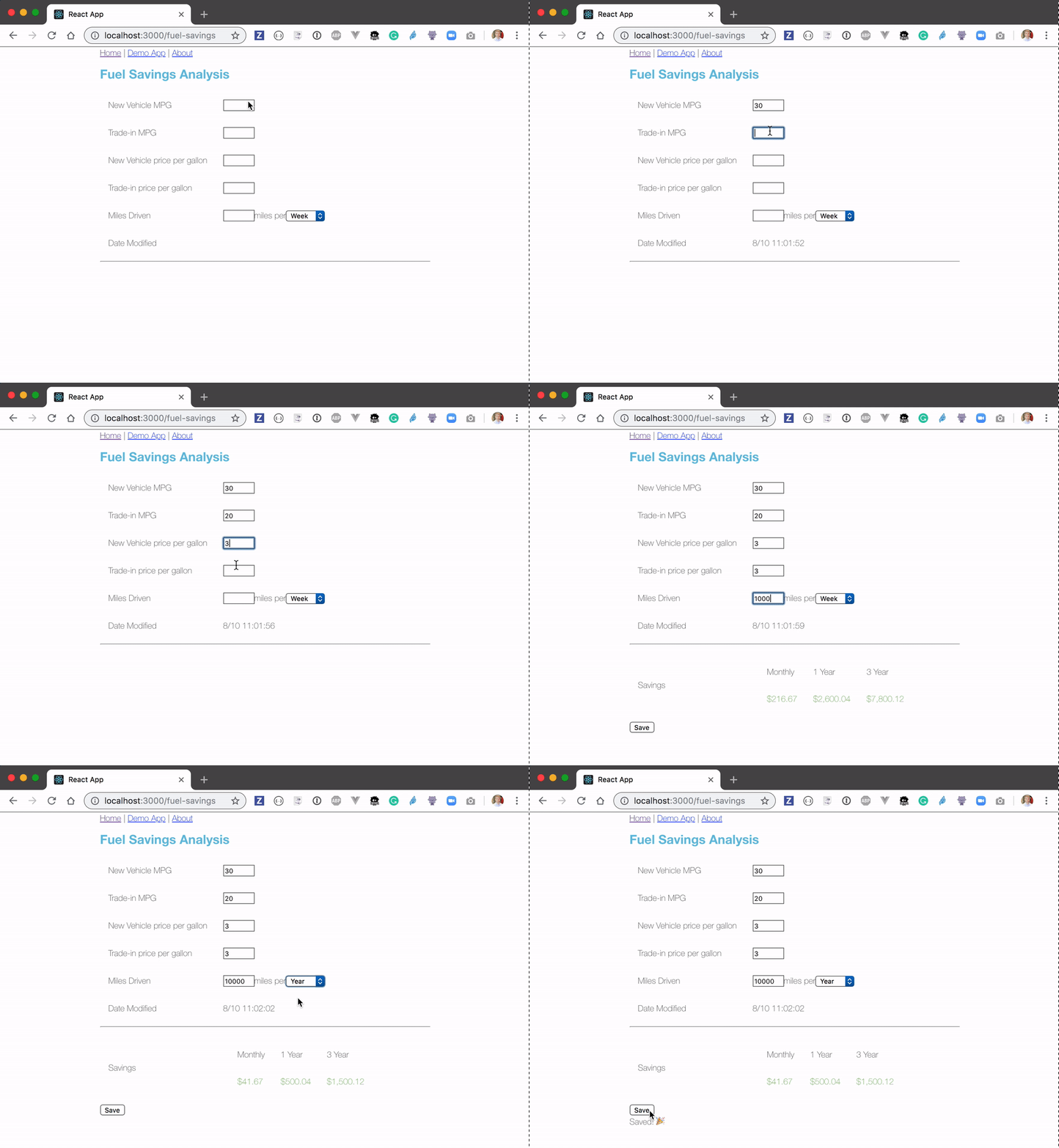
Let's write a Cypress test in the `cypress/integration/spec.js` file. The test repeats everything a user is doing in the animation above.
```js
///
beforeEach(() => {
cy.visit('/')
})
it('saves fuel', () => {
cy.contains('Demo App').click()
cy.url().should('match', /fuel-savings$/)
cy.get('#newMpg').type('30')
cy.get('#tradeMpg').type('20')
cy.get('#newPpg').type('3')
cy.get('#tradePpg').type('3')
cy.get('#milesDriven').type('10000')
cy.get('#milesDrivenTimeframe').select('year')
cy.get('td.savings')
.should('have.length', 3)
.and('be.visible')
.first() // Monthly
.should('contain', '$41.67')
cy.get('#saveCompleted').should('not.be.visible')
cy.get('#save').click()
cy.get('#saveCompleted').should('be.visible')
})
```
The test runs and passes.
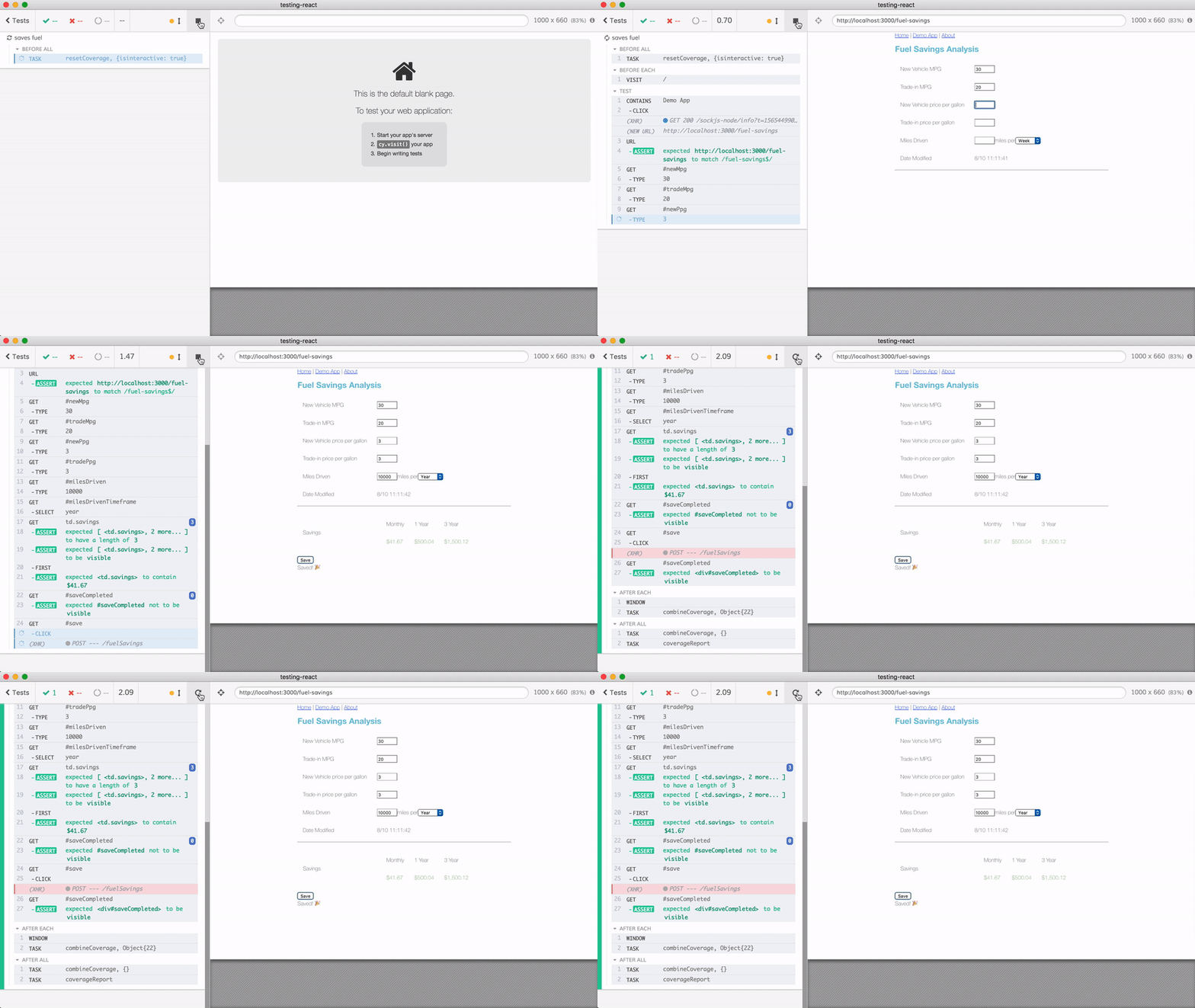
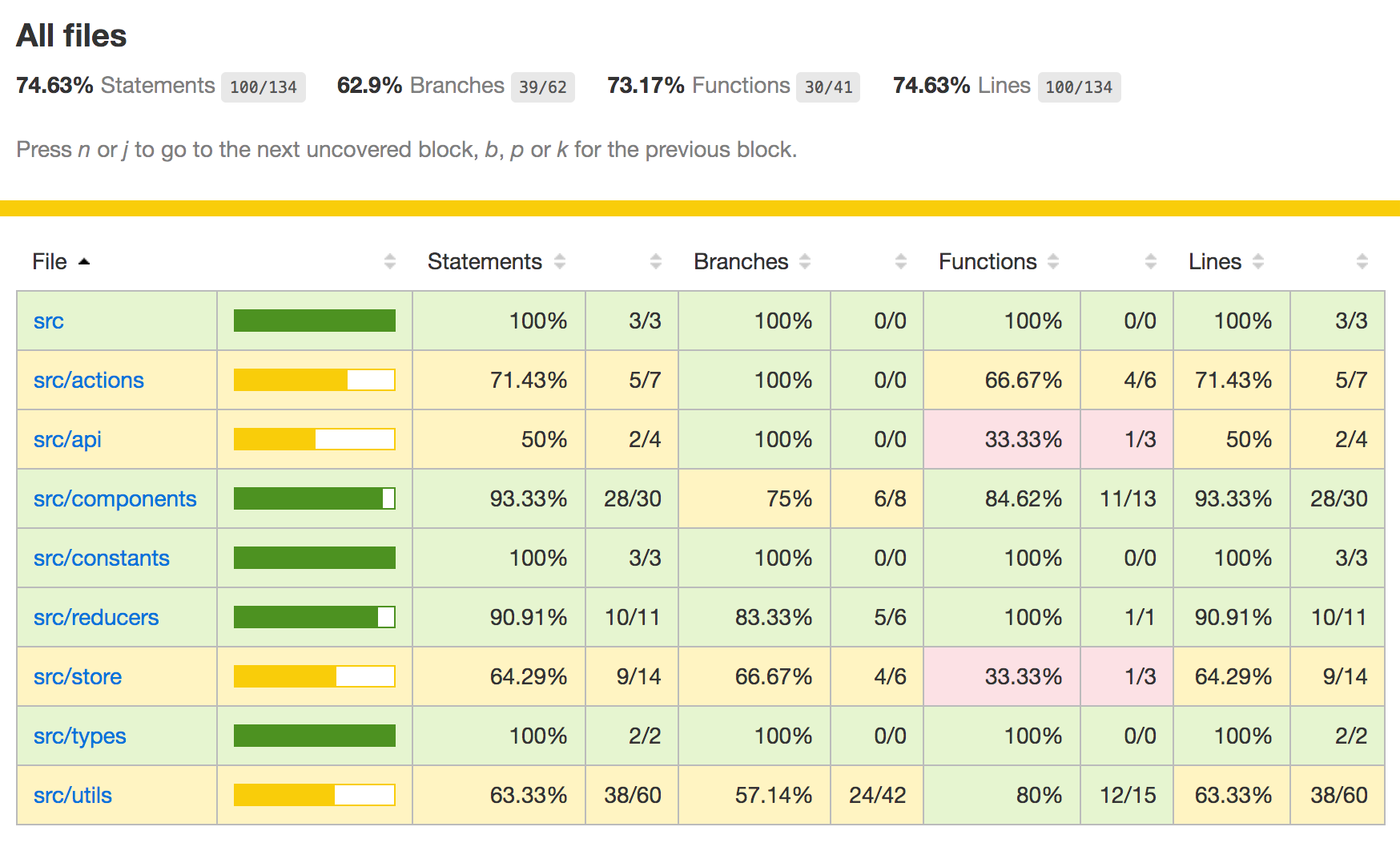
The code coverage report has been saved automatically after the tests have finished. Open it with `**$** open coverage/lcov-report/index.html` and see that a single test can reach a lot of code.
## Stubbing XHR
Notice the failed XHR call from the application after `cy.get('#save').click()` command. You can see the failed call in the DevTools Network tab.
The frontend is calling the backend API, which does not exist yet! Luckily, Cypress includes [network stubbing](https://on.cypress.io/network-requests?ref=cypress-io.ghost.io) that allows you to write full end-to-end tests before the external APIs even exist. Here is the updated portion of the test where we will intercept the `POST /fuelSavings` XHR call and respond with an empty object and status 200.
```js
// stub API call
cy.server()
// does not really matter what the API returns
cy.route('POST', 'http://localhost:3001/fuelSavings', {}).as('save')
cy.get('#saveCompleted').should('not.be.visible')
cy.get('#save').click()
cy.get('#saveCompleted').should('be.visible')
```
The application is now happy, because the mock "server" responds with 200 HTTP status. If we click on the XHR command, we can see the details of the request made by the application.
Let's make our test even tighter - let us assert the request body. This way we can ensure that our application always sends the expected data, even as we refactor front-end source code in the future. Since we already gave the XHR stub an alias name `save`, we can simply get it in our test and assert its properties.
```js
cy.get('#save').click()
cy.get('#saveCompleted').should('be.visible')
cy.wait('@save')
.its('request.body')
.should('deep.equal', {
milesDriven: 10000,
milesDrivenTimeframe: 'year',
newMpg: 30,
newPpg: 3,
tradeMpg: 20,
tradePpg: 3
})
```
Hmm, we have a slight problem. The application is sending a timestamp to the backend, which is dynamic and prevents us from using `deep.equal` assertion. Luckily, we can control the clock in the application using [`cy.clock`](https://on.cypress.io/clock?ref=cypress-io.ghost.io) method. Let's set a mock date before clicking "Save" - this way the timestamp sent to the server will always be the same.
```js
// before we try saving, let's control the app's clock
// so it sends the timestamp we expect
// @see https://on.cypress.io/clock
const mockNow = new Date(2017, 3, 15, 12, 20, 45, 0)
cy.clock(mockNow.getTime())
cy.get('#save').click()
cy.get('#saveCompleted').should('be.visible')
// check the "save" POST - because we set the mock date
// in our application, we know exactly all the fields we expect
// the application to send to the backend
cy.wait('@save')
.its('request.body')
.should('deep.equal', {
dateModified: mockNow.toISOString(),
milesDriven: 10000,
milesDrivenTimeframe: 'year',
newMpg: 30,
newPpg: 3,
tradeMpg: 20,
tradePpg: 3
})
```
## Increasing code coverage
After the first test, our code coverage stands at 77%. Let's look at a couple of missed areas and how we can increase the coverage. For example in file `src/api/fuelSavingsApi.js` we have missed the error path.
Here is the test that reaches this line - it stubs the network call, responds with an error, and stubs the `console.log` method in the application's window.
```js
// stub API call - make it fail
cy.server()
cy.route({
method: 'POST',
url: 'http://localhost:3001/fuelSavings',
status: 500,
response: ''
})
cy.window().then(w => cy.stub(w.console, 'log').as('log'))
cy.get('#save').click()
cy.get('@log').should('have.been.calledOnce')
```
Once this test finishes, we can confirm that it hits the line we want to reach
Next we can see that we are missing tests that open the "About" page, and the 404 page has never been triggered.
Here are a couple of tests that exercise the additional pages:
```js
///
beforeEach(() => {
cy.visit('/')
})
it('has greeting and links', () => {
cy.contains('h1', 'Demo App').should('be.visible')
cy.contains('[aria-current=page]', 'Home')
.should('be.visible')
.and('have.attr', 'href', '/')
})
it('opens about page', () => {
cy.contains('h1', 'Demo App').should('be.visible')
cy.contains('About').click()
cy.get('#about-header').should('be.visible')
})
it('has not found page', () => {
cy.contains('h1', 'Demo App').should('be.visible')
cy.visit('/nosuchpage')
cy.contains('404').should('be.visible')
cy.contains('a', 'Go back').click()
cy.location('pathname').should('equal', '/')
})
```
## Unit tests
Taken together, the application and page specs cover almost 80% of the code
The largest number of code not covered by the tests is in `src/utils` files.
Let's look at the `math.js` source for example.
Do you notice anything unusual? Functions `addArray` and `convertToPennies` are never called by the outside code! I guess they were superseded by the `roundNumber` function that is used by the outside code. The code coverage report helps us find unused code and delete it - as long as the tests still pass, we are good.
The edge cases in `roundNumber` are still necessary to cover with tests though. For example, it is hard to trigger the `numberToRound === 0` condition from end-to-end tests. We need to write a unit test!
Cypress can run unit tests, and before we write any, we need to ensure that _spec files are instrumented_, just like our application code was instrumented to collect code coverage. Just add the line to handle \`file:preprocessor\` event to the `cypress/plugins/index.js` file. The preprocessor included with Cypress code coverage plugin will instrument the loaded spec files and any code loaded from the spec files directly.
```js
module.exports = (on, config) => {
// `on` is used to hook into various events Cypress emits
// `config` is the resolved Cypress config
// custom tasks for sending and reporting code coverage
on('task', require('@cypress/code-coverage/task'))
// this line instruments spec files and loaded unit test code
on(
'file:preprocessor',
require('@cypress/code-coverage/use-browserify-istanbul')
)
}
```
Now we can write a unit test, directly importing application sources into specs.
```js
///
import { roundNumber } from '../../src/utils/math'
context('unit tests', () => {
describe('roundNumber', () => {
it('correctly rounds different numbers', () => {
expect(roundNumber(0.1234, 2), '0.1234 to 2').to.equal(0.12)
expect(roundNumber(0), '0').to.equal(0)
expect(roundNumber(), 'empty string').to.equal('')
expect(roundNumber(0.1234), '0.1234').to.be.NaN
expect(roundNumber(0.1234, -1), '0.1234 to -1').to.equal(0)
})
})
})
```
The test passes, and notice how there is no application loaded on the right, since the unit test never calls `cy.visit`
But the code coverage report shows that we cover all statements and branches in the `math.js` file
Similarly, we can chase all source lines in other utility files, writing a few more unit tests. You can find them in `cypress/integration/utils-spec.js` file. The final coverage report is 96% - only missing some redux store configuration paths, which is fine.
You can find the entire pull request that adds code instrumentation, coverage reporting and tests in [https://github.com/coryhouse/testing-react/pull/3](https://github.com/coryhouse/testing-react/pull/3?ref=cypress-io.ghost.io)
## See also
- **[Cypress Code Coverage Guide](https://on.cypress.io/code-coverage?ref=cypress-io.ghost.io)**
- **[Writing Cypress tests in TypeScript using create-react-app v3](https://www.cypress.io/blog/2019/05/13/code-create-react-app-v3-and-its-cypress-tests-using-typescript/?ref=cypress-io.ghost.io)**