Multi-tab testing in Cypress: @cypress/puppeteer 1.0 is generally available
By Jennifer Shehane
A receipt opens in a new tab. A sign-in or payment provider opens a popup, waits for the user to approve, and reports back to your app. A user signs out in one tab, and every other open tab has to follow. These flows are common in web apps, and they hit the same limit in a test: Cypress runs your test in a single tab, so a Cypress command can't reach the tab or popup your app just opened.
Since November 2023, the @cypress/puppeteer plugin has covered that gap as a public beta. It runs Puppeteer code (Puppeteer is a Node.js library for controlling Chromium-based browsers) against the same browser Cypress launched, then hands the result back to your Cypress test for assertions.
Today, @cypress/puppeteer 1.0.0 is generally available (GA), and a new Cypress multi-tab testing guide walks through setup, browser support, and worked examples for the most common multi-tab flows.
What changes with @cypress/puppeteer 1.0
Version 1.0.0 removes the beta label and makes the plugin's API a stable contract. setup(), retry(), and cy.puppeteer() work the same way they did in 0.1.x.
0.1.x (beta) | 1.0.0 (GA) | |
|---|---|---|
Status | Public beta | Generally available |
API stability | Any release could change the API | Breaking changes require a new major version |
Bundled Puppeteer |
|
|
Minimum Cypress version | 13.6.0 | 14.0.0 |
Minimum Node.js version | Set by your Cypress version | 18 |
Documentation | Plugin README | README plus the multi-tab testing guide on docs.cypress.io |
The move to puppeteer-core v24 keeps the plugin compatible with current Chrome releases and picks up Puppeteer's more reliable handling of connections to an already running browser. Puppeteer v24 needs Node.js 18 or later and Cypress 14.0.0 or later.
The plugin itself works the way it always has. When you hook into the plugin, work in other tabs runs in Puppeteer, in Node.js, and the plugin passes the result back to your test.
Check whether your Cypress test needs a second tab
Before you add the plugin, ask what the test is really checking. Often it's only that your app opens the right page, and nothing passes between the tabs while both are open. You can test that from the Cypress tab, in every browser Cypress supports, with no plugin.
When the link itself is the behavior you care about, assert its attributes:
cy.contains('a', 'View receipt')
  .should('have.attr', 'target', '_blank')
  .and('have.attr', 'href', '/receipt.html')
To check the destination page too, remove the target attribute before clicking, so the browser opens the link in the Cypress tab:
cy.contains('a', 'View receipt').invoke('removeAttr', 'target').click()
cy.contains('h1', 'Receipt for order #1234')
When your app opens a tab from JavaScript, stub window.open before the page loads and assert how your app called it:
cy.visit('/connect.html', {
  onBeforeLoad(win) {
    cy.stub(win, 'open').as('open')
  },
})
cy.contains('button', 'Connect calendar').click()
cy.get('@open').should('have.been.calledWith', '/authorize.html')
Use @cypress/puppeteer when the test depends on what happens inside the other tab, or on the tabs talking to each otherExamples that should use the @cypress/puppeteer include a popup that reports back to your app, a change in one tab that has to show up in another, or two users interacting at once. The guide's section on testing new-tab links when the tabs don't interact has some full examples.
How @cypress/puppeteer connects Cypress to other tabs
The plugin has two halves.
- In your Cypress config,
setup()registers named message handlers. Each handler runs in Node.js and receives a PuppeteerBrowserconnected to the browser Cypress launched. - In your spec,
cy.puppeteer('handlerName', ...args)runs that handler and yields whatever it returns, so you can chain Cypress assertions on the result.
Each time cy.puppeteer() runs, the plugin connects Puppeteer to the browser, calls your handler, and disconnects again. The browser stays open throughout. In headed Chromium-based browsers, the plugin also brings the Cypress tab back to the front before it disconnects, so your test continues where it left off.
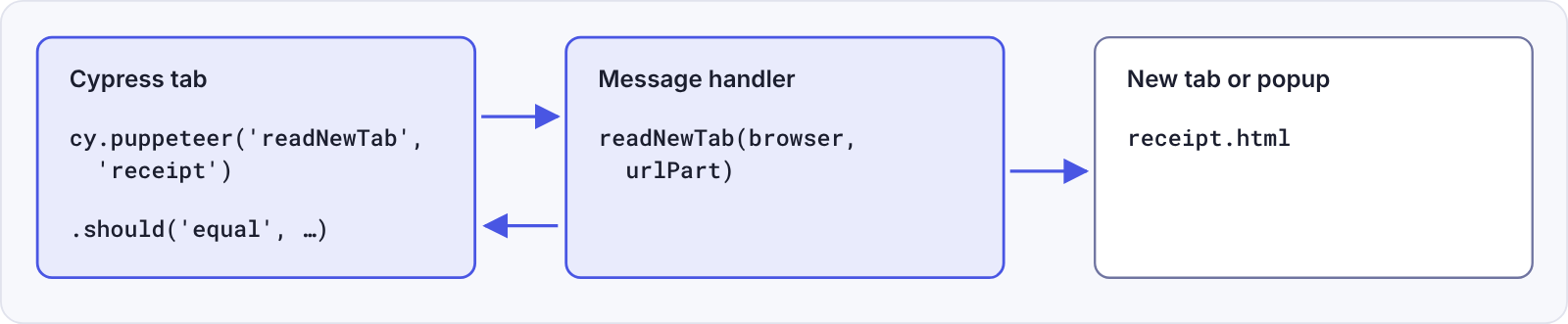
Keep these behaviors in mind as you write handlers:
cy.puppeteer()runs your handler once and doesn't retry. When a handler depends on something that takes time, like a tab that's still opening, wait for it inside the handler withretry()or a Puppeteer method such aspage.waitForSelector().browser.pages()lists every tab and window, including the tab Cypress runs in. That tab's URL contains/__/, so skip it when you look for a tab by URL.- Each call gets a fresh connection. Look up pages inside the handler every time instead of keeping a
Pagearound for the next call. cy.puppeteer()runs on top ofcy.task(), so arguments and return values must be serializable, and a handler that runs longer thantaskTimeout(60 seconds by default) fails the command.- The Command Log shows one
puppeteerentry for the whole handler, followed by any assertions you chain on its result.
Set up @cypress/puppeteer for multi-tab testing
This setup uses Cypress 14.0.0 or later and a Chromium-based browser. The example reads the heading of a receipt that an order page opens in a new tab.
Step 1: Install @cypress/puppeteer
The plugin bundles its own copy of puppeteer-core, so you don't need to install Puppeteer separately.
npm install --save-dev @cypress/puppeteerStep 2: Import the support file
The support file adds the cy.puppeteer() command:
// cypress/support/e2e.js
import '@cypress/puppeteer/support'
Step 3: Register a message handler in your Cypress config
The readNewTab handler finds the new tab by its URL, reads its heading, and closes the tab so it doesn't carry over into the next test. retry() keeps calling the lookup until the tab has opened, for up to 4 seconds by default:
// cypress.config.ts
import { defineConfig } from 'cypress'
import { setup, retry } from '@cypress/puppeteer'

export default defineConfig({
  e2e: {
    setupNodeEvents(on) {
      setup({
        on,
        onMessage: {
          async readNewTab(browser, urlPart: string) {
            // The tab can take a moment to open, so keep looking until it does
            const page = await retry(async () => {
              const pages = await browser.pages()
              const tab = pages.find((p) => p.url().includes(urlPart))

              if (!tab) throw new Error(`No tab with a URL containing "${urlPart}"`)

              return tab
            })

            const heading = await page.waitForSelector('h1')
            const text = await heading?.evaluate((el) => el.textContent)

            await page.close()

            return text
          },
        },
      })
    },
  },
})
Register all of your handlers in a single setup() call. A second call replaces the handlers from the first.
Step 4: Call the handler from your spec
The spec clicks the link, then asserts on the text the handler yields:
// cypress/e2e/order.cy.js
it('shows the receipt in a new tab', () => {
  cy.visit('/order.html')
  cy.contains('a', 'View receipt').click()

  cy.puppeteer('readNewTab', 'receipt').should('equal', 'Receipt for order #1234')
})
Step 5: Add the types for TypeScript projects
If you write your tests in TypeScript, add the plugin's support types to your tsconfig.json so your editor recognizes cy.puppeteer():
{
  "compilerOptions": {
    "types": ["cypress", "@cypress/puppeteer/support"]
  }
}
The setup section of the multi-tab testing guide includes install commands for every package manager.
Multi-tab workflows in the Cypress multi-tab testing guide
The receipt example is the simplest case. The guide has a worked example, with the app markup, the handler, and the spec, for each of these flows:
Workflow | Common examples |
|---|---|
Receipts, invoices, export previews | |
Sign-in, payment, and account-linking popups | |
A theme or setting that syncs across tabs, signing out in every tab | |
Chat, comments, shared documents | |
An | |
An image of every tab in a failed CI run |
A separate browser context has its own cookies and storage, so it acts like a second person on another computer while still running in the browser Cypress launched. That's what makes the two-user example work: the Cypress tab stays signed in as one user while the handler signs in as another.
The guide also includes a troubleshooting section for @cypress/puppeteer errors, with the exact error messages you might see and what each one means.
Browser support for @cypress/puppeteer 1.0
The plugin works in Chromium-based browsers. What works also depends on whether the browser runs headless (cypress run) or headed (cypress open or cypress run --headed):
Browser | Headless | Headed | Open new tabs with |
|---|---|---|---|
Chrome for Testing, Chromium | Yes | Yes | Yes |
Google Chrome 136 and earlier | Yes | Yes | Yes |
Google Chrome 137 and later | Yes | No | Yes, headless only |
Electron | Yes | Yes | No |
Edge and other Chromium-based browsers | Yes | Only if the browser can load the Cypress extension | Yes |
Firefox, WebKit | No | No | No |
Two of those browsers have limits:
- Google Chrome 137 and later can't run the plugin headed. In a headed browser, the plugin uses the Cypress extension to bring the Cypress tab back to the front, and Chrome 137 removed the
--load-extensionflag that loads it. Withsetup()in your Cypress config, headed Chrome 137 or later fails to launch, even for specs that never callcy.puppeteer(). For headed runs, use Chrome for Testing or Chromium. The Cypress Docker images repository has examples for Chrome for Testing and Chromium. - Electron works with tabs your app opens, but can't create new ones.
browser.newPage()andbrowser.createBrowserContext()fail in Electron, Electron can't screenshot another tab, and a popup your app opens in Electron has nowindow.opener. Flows that need any of these run in Chrome, Chromium, or Edge.
Headless runs work in every supported browser, including any version of Google Chrome, so most CI setups need nothing extra beyond choosing a Chromium-based browser:
npx cypress run --browser chromeIf part of your suite runs in Firefox or WebKit, guard plugin calls with Cypress.browser.family === 'chromium' so the rest of the suite keeps running in those browsers.
Upgrade @cypress/puppeteer from 0.1.x to 1.0
The plugin's own API is the same in 1.0. What can change is the code inside your handlers, because each handler receives a Puppeteer Browser directly. Puppeteer's breaking changes between v21 and v24 apply to that code.
These are the Puppeteer changes most likely to show up in handlers:
Puppeteer v21 | Puppeteer v24 |
|---|---|
| Removed. Wait for a specific condition with |
| Removed. Use the |
| Renamed to |
| Removed. Import |
| Removed. Use |
Screenshot and PDF methods typed as returning a Node.js | Typed as returning a |
| They include the fragment, such as |
To upgrade:
- If you're on Cypress 13, upgrade to Cypress 14.0.0 or later.
- Search your message handlers for the APIs in the table and update them.
- If you pass your own Puppeteer module to
setup()with thepuppeteeroption, upgrade it to v24 too. - Install the new version with
npm install --save-dev @cypress/puppeteer@1. - Run the specs that call
cy.puppeteer().
The Upgrading to 1.0 section of the @cypress/puppeteer README links to the complete list of Puppeteer breaking changes for versions 22, 23, and 24.
Frequently asked questions about @cypress/puppeteer
Can Cypress test multiple tabs?
Cypress runs each test in a single tab. With the @cypress/puppeteer plugin, a test can read and control other tabs and popups in the same browser through Puppeteer, then assert on the results in Cypress.
Is @cypress/puppeteer free?
Yes. @cypress/puppeteer is an open source npm package under the MIT license that is supported by the Cypress team. It runs locally and in CI and doesn't need Cypress Cloud.
Do I need to install Puppeteer?
No. Version 1.0 bundles puppeteer-core v24. To use your own copy instead, pass it to setup() with the puppeteer option, and install a version that satisfies the plugin's puppeteer-core dependency.
Which versions of Cypress and Node.js does @cypress/puppeteer 1.0 support?
Version 1.0 requires Cypress 14.0.0 or later and Node.js 18 or later. Every Node.js version that Cypress 14 supports already meets the Node.js requirement. On Cypress 13, stay on @cypress/puppeteer@0.
Does @cypress/puppeteer work in Firefox or WebKit?
No. The plugin needs a Chromium-based browser, such as Chrome, Chrome for Testing, Chromium, Edge, or Electron. In Firefox or WebKit, cy.puppeteer() fails with an error.
Does @cypress/puppeteer work with Cypress Component Testing?
No. The plugin is for Cypress End-to-End Testing.
Does cy.puppeteer() retry like other Cypress commands?
No. It runs your handler once. Wait for slow conditions inside the handler with retry() or a Puppeteer method such as page.waitForSelector().
Does Test Replay show the other tabs?
No. Test Replay, Cypress screenshots, and videos record the Cypress tab. To keep a picture of the other tabs from a failed run, use the screenshot example in the multi-tab testing guide.