How the Cypress Cloud Errors tab helps you triage faster
By Jennifer Shehane
After a run fails, the first question is rarely "which tests failed?" It's "why did they fail, and how many different problems am I actually dealing with?"
Those are different questions, and the answer changes what you do next. Forty failing tests with forty distinct error messages means forty separate problems to investigate. Forty failing tests with the same error message means one problem to fix.
That model is what makes the Errors tab within each Cypress run useful for triage. Each error group shows the error message once, then lists every test attempt where that error occurred. That includes retries. If a flaky test failed three times before eventually passing, each of those failed attempts appears in the group. That matters because it tells you how prevalent the error actually is. An error that appears across dozens of retry attempts in otherwise passing tests is a different kind of problem than one that causes clean, consistent failures.
But until now, reading the Errors tab required more effort than it should. Errors loaded collapsed, so you had to expand each group manually. Every test in the list appeared as failed regardless of whether it had actually flaked. And there was no direct path to Test Replay without navigating to a different view.
What changed in the Errors tab
The latest update to Cypress Cloud addresses all of this.
Test Replay is now accessible directly from each error
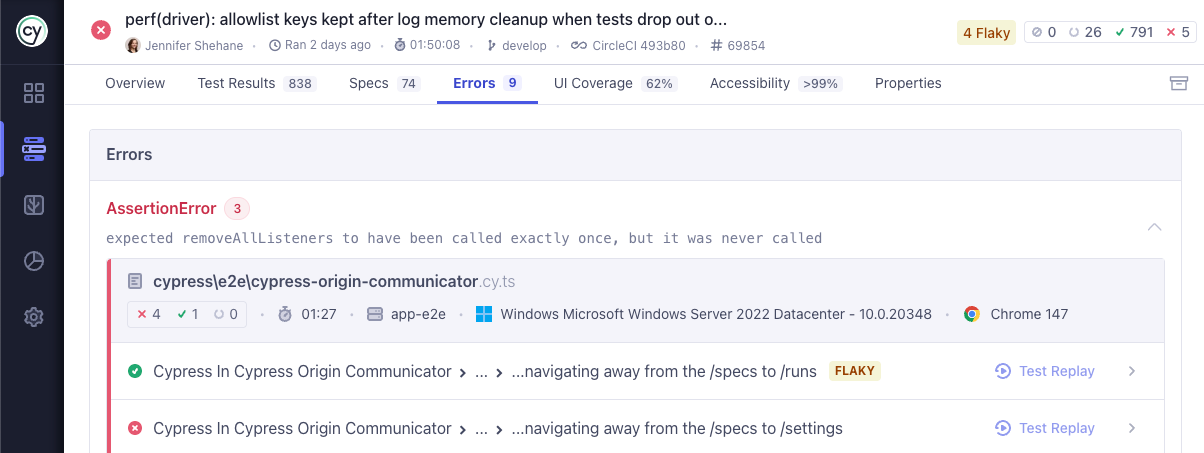
When Test Replay is available, error rows now include a direct link to the replay for that test. Clicking the row opens the test drawer and the Test Replay link takes you directly to the replay to review.
This eliminates a step that previously required navigating out of the Errors tab, locating the test in a different view, and then opening the replay from there.
Test status now shows flaky tests
Each error group lists every test attempt where that error appeared, including retries when retries are enabled. Before this update, every attempt in that list showed a failed status icon, even if the test had ultimately flaked and passed rather than failed. That made it harder to understand whether an error was causing consistent failures, intermittent ones, or both.
Errors are now expanded by default
Previously, the Errors tab loaded with every error row collapsed. You had to click into each one to see what it contained. Now, errors are expanded when the tab loads, so you see the full picture immediately.
What to do next
The next time you review a failed run in Cypress Cloud, open the Errors tab. The layout will look different: errors expanded, status accurate, environment context visible, and Test Replay one click away when capture is on.