The Electron browser is being deprecated in Cypress
By The Cypress Team
Over the years, we have watched teams get different results from the same test suite depending on whether it ran in Electron or in a browser their users actually use. A test passes in Electron and fails in Chrome. A spec that was stable in CI breaks the moment someone runs it locally in Chrome. The difference is often hard to track down, because Electron looks close enough to Chrome to be mistaken for it.
We have decided to close that gap. Starting with Cypress 16.0.0, the bundled Electron browser is deprecated as a test browser, and it will be removed in a future major version. We are standardizing on running on installed browsers, so your test results reflect how your application behaves for the people who use it.
This post explains what we observed, why we made this call, and how to move your local and continuous integration (CI) runs to an installed browser ahead of removal to reduce disruptions.
Does this affect you?
You are affected if any of your runs target Electron, which is the default browser Cypress runs within. If you have not set a browser, either with --browser on the command line or defaultBrowser in your Cypress configuration, your runs are likely using Electron right now.
You are not affected if you already run every local and CI command against an installed browser such as Chrome for Testing, Chrome, Firefox, or Edge. In that case, nothing changes for you, and you can stop reading here.
Why we made this decision
We originally added Electron to make getting started with Cypress fast. It ships inside Cypress as a build of Chromium packaged with Electron, the framework we also use to build the Cypress app, so you could install Cypress and run your first test without installing a browser yourself. At the time, that removed a real point of friction.
That tradeoff made sense then, and it makes less sense now. Setting up a browser across local, Docker, and CI environments has become far easier over the years. Options such as the Cypress Docker images, the official GitHub Action, and the CircleCI Orb come with browsers ready to use, so the convenience that justified a bundled browser no longer outweighs its cost.
Over that same period, our team has seen the same pattern repeat: the experience of running tests in Electron varies in ways that are hard to predict and harder to debug. Three issues drive that variation.
Electron lags Chromium
Electron's Chromium version is tied to the Electron release that Cypress bundles. In practice, that version trails current stable Chrome by weeks or months, so your tests can miss recent web-platform features and fixes that your users already have.
Electron behaves differently from Chrome
Because Electron is an embedded Chromium rather than the browser your users run, test behavior can differ from real Chrome. We have observed cases where a test passes in Electron and fails in Chrome, with known differences in areas such as rendering, file handling, and dialog behavior (for example, dialog handling on beforeunload and uploading large files). When results depend on a browser your users never touch, a green suite is harder to trust.
Electron slows down security updates
When Chromium publishes a security fix, Electron has to incorporate it, and then we have to ship an updated Electron build to you. That chain adds delay. When you run an installed browser, your browser vendor ships fixes directly and you control when to update. This change is preventative: it puts responsibility for staying current where it belongs, with the browser vendor and your team.
Most recorded runs already use an installed browser, so for many teams this decision simply matches how they already work. The steps below make sure your runs are not relying on the Electron browser.
How to migrate
1. Install a supported browser
Install a supported browser in your local and CI environments, such as Google Chrome. If you would rather not install one yourself, our continuous integration guides cover browser options for CI, including the Cypress Docker images, the GitHub Action, and the CircleCI Orb.
2. Set a default browser
Set a defaultBrowser so Cypress no longer falls back to Electron when no browser is specified:
import { defineConfig } from 'cypress'

export default defineConfig({
  defaultBrowser: 'chrome',
})
The defaultBrowser option applies whenever you do not pass --browser on the command line.
3. Or pass a browser explicitly
If you prefer to set the browser at run time, pass --browser wherever you launch Cypress:
cypress run --browser chrome
4. Update your CI configuration
If your pipeline relied on the implicit Electron default, update any jobs that previously ran without a browser argument to target an installed browser. See the continuous integration guides above for provider-specific setup.
5. Update your Docker image, if you use one
If you use the cypress/base Docker image and do not explicitly install a browser, switch to cypress/browsers, which includes Chrome, Firefox, and Edge, or install a browser yourself.
6. Remove any explicit Electron usage
Replace any remaining --browser electron, defaultBrowser: 'electron', or { browser: 'electron' } test or suite overrides with an installed browser.
Remove any cypress.config.js|ts checks for electron
const { defineConfig } = require('cypress')

module.exports = defineConfig({
  e2e: {
    setupNodeEvents(on, config) {
      on('before:browser:launch', (browser = {}, launchOptions) => {
        // 👇 no-op, can be safely removed
        if (browser.name === 'electron') {
          launchOptions.preferences.devTools = true
        }
        return launchOptions
      })
    },
  },
})
Remove any Electron specific environment variables
// 👇 no-op, can be safely removed
export ELECTRON_EXTRA_LAUNCH_ARGS=--disable-http-cache --lang=es
Remove any electron checks through Cypress.browser, Cypress.isBrowser or suite/test configuration.
it('has correct Electron workaround', () => {
  // 👇 no-op, can be safely removed
  if (Cypress.browser.name === 'electron') {
    // special handling here
  }
})

it('has another Electron workaround', () => {
  // 👇 no-op, can be safely removed
  if (Cypress.isBrowser('electron')) {
    // special handling here
  }
})

// 👇 no-op, test configuration can be safely removed
it('has behavior in electron only', { browser: 'electron' }, () => {
  // special test here
})
What happens after removal
Until removal, targeting Electron keeps working but emits a deprecation warning in cypress run output and the Electron browser will display as deprecated in the Cypress app.
Warning: The Electron browser is deprecated as a test browser and will be removed in a future version of Cypress.

Switch to Chrome or another installed browser to avoid a breaking change when you upgrade.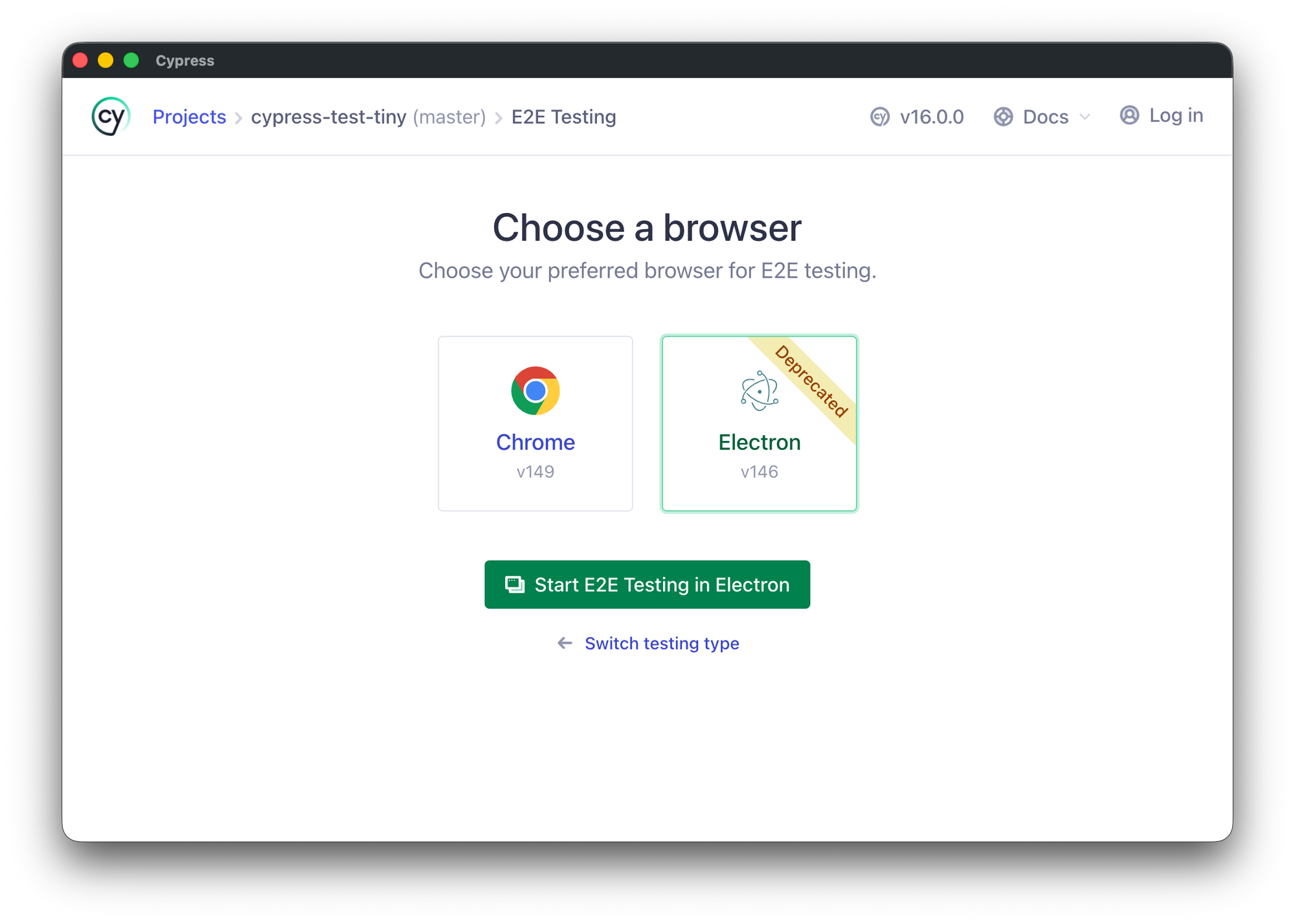
After Electron is removed, any run that targets it, whether through --browser electron, a defaultBrowser: 'electron' setting, or an implicit fallback when no browser is specified, will fail with an error.
We will give clear, advance notice before the release that removes Electron, and we will publish a dedicated migration guide alongside the timeline. We are not removing support without warning.
What browser does Cypress recommend we use for testing?
Where possible, run your tests in Chrome for Testing for reliable, reproducible runs. It is a dedicated Chrome flavor that Google builds specifically for automation, and it has a few advantages over a standard Chrome installation:
- No auto-update. Regular Chrome is evergreen, meaning it updates itself silently, which can change browser behavior between runs and cause a test that passed yesterday to fail today. Chrome for Testing is pinned to a specific version and does not update on its own, so your environment stays consistent.
- Versioned, reproducible binaries. A matching build is published for every Chrome version and every major operating system, so you can install the exact same browser locally and in CI. See download a specific Chrome version.
- Built for automation, not browsing. Because it is intended only for testing, it is not subject to the enterprise or group Chrome policy settings often applied to branded Chrome, such as disabling remote debugging, which removes a common cause of launch failures.
- Extension loading still works. Standard Chrome version 137 and above can no longer load extensions through the Browser Launch API, because Chrome removed the underlying flag. Chrome for Testing and Chromium can still load them.
To run against Chrome for Testing, follow the instructions for downloading and pass it like any other browser:
npx cypress run --browser chrome-for-testingThe takeaway
We made this decision to give you more reliable test results. When your suite runs in the same browsers your users do, on the same update cadence your users already get, a green run means more confidence in a quality release.
If your runs currently fall back to Electron, set an installed browser now, well before removal, so the change lands as a configuration update on your schedule.
If you want to go further, our guide to cross-browser testing covers running the same suite across Chrome, Firefox, and Edge in CI, so you can catch browser-specific issues before your users do.