Cypress vs Playwright
Last updated
- design-system
- assets
- cypress
- e2e
- Authentication.cy.ts
- e2e
- src
- components
- Button.cy.tsx
- Button.tsx
- components
- assets
describe('Auth', () => {
  it('user should be able to log in', () => {
    cy.visit('/')

    // open the login modal
    cy.get('button').contains('Login').click()

    // fill in the form
    cy.get('input[type="email"]').type('[email protected]')
    cy.get('input[type="password"]').type('test123')

    // submit the form
Introducing Cypress
The leading open-source framework for automated browser testing
Since its introduction, Cypress has quickly become the most developer-loved automated browser testing framework for modern web applications.
Extend your testing with Cypress Cloud
Nearly every team runs tests; not every team ships with confidence. The difference is what happens between "tests passed" and "ready to release," and that gap is exactly where quality falls apart.
Playwright is a testing framework, but that's where it ends. Users are left piecing together third-party tools for analytics, debugging, collaboration, accessibility compliance, and test coverage. Stitching tools together costs time, introduces gaps, and adds risk at exactly the moment teams can least afford it. Cypress is the only application quality platform that does it all, so your team spends less time managing tooling and more time shipping software you can trust.
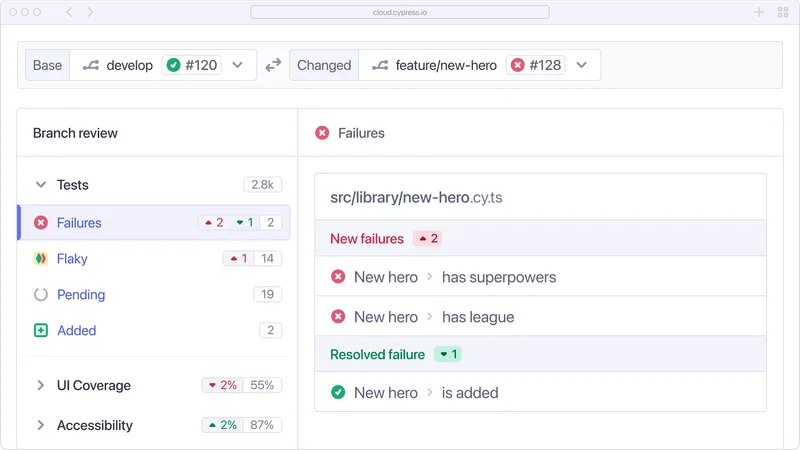
Debugging superpowers
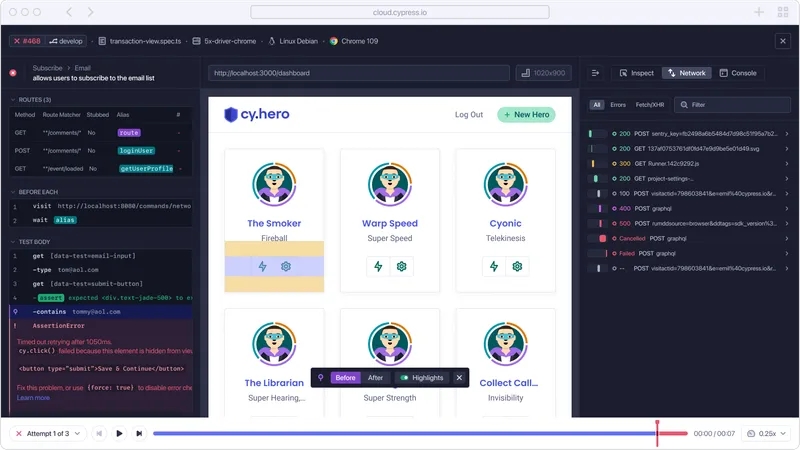
A bug you cannot reproduce is a bug you cannot fix. Cypress redefines debugging with integrated time-travel and replay, making it possible to see exactly what happened at every moment in every test in any environment. Test Replay captures the full DOM state, network requests, and console logs at each step, not snapshots at select points like Playwright, but the complete picture. By giving teams visual insights and actionable feedback, Cypress saves countless hours and ensures even the most elusive bugs are resolved with confidence.
Flaky test management
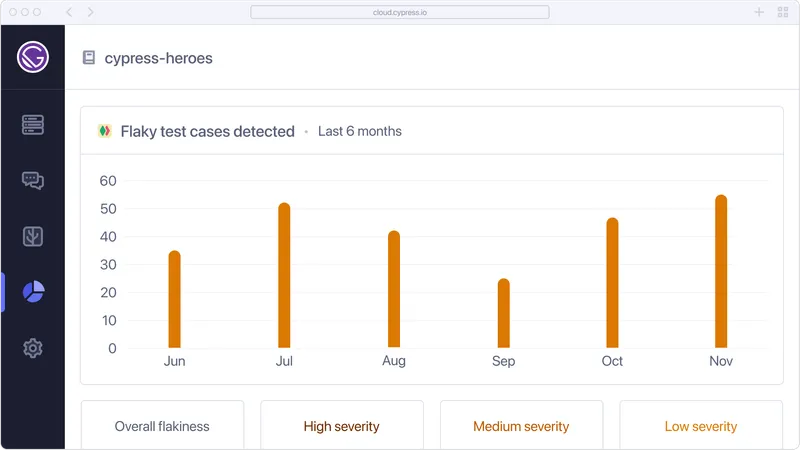
Flaky tests undermine every testing pipeline. Cypress Cloud manages them directly by automatically detecting flaky tests, flagging them in your results, and providing analytics to help you pinpoint and address the root cause. Playwright lacks built-in support for identifying or analyzing flaky tests over time, leaving teams to manage this manually or rely on external tools. With Cypress, you can eliminate instability in your suite, ensuring reliable results that developers can trust.
Integrate seamlessly into your workflow
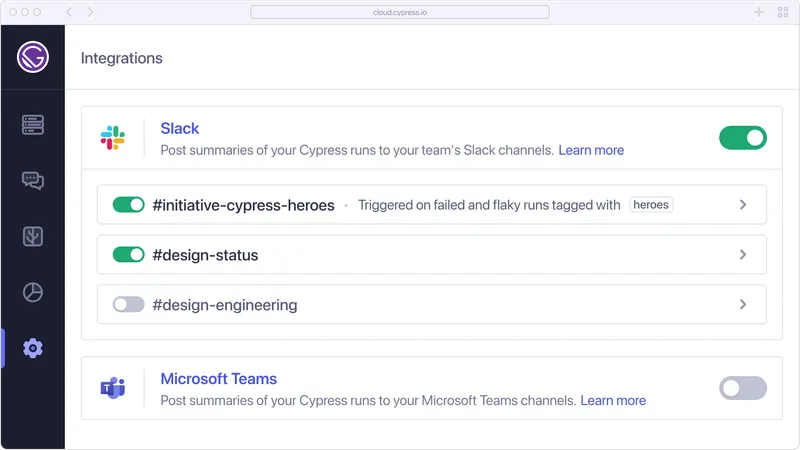
Quality checks are only useful where your team actually works. Cypress integrates with the tools your team already relies on, including version control systems, CI/CD platforms, and collaboration tools like Slack, Teams, and Jira. Test results, analytics, coverage data, and accessibility scores surface where decisions get made. Playwright's third-party integration support is limited by comparison. With Cypress, quality is embedded in your workflow, not siloed from it.
Enterprise capabilities
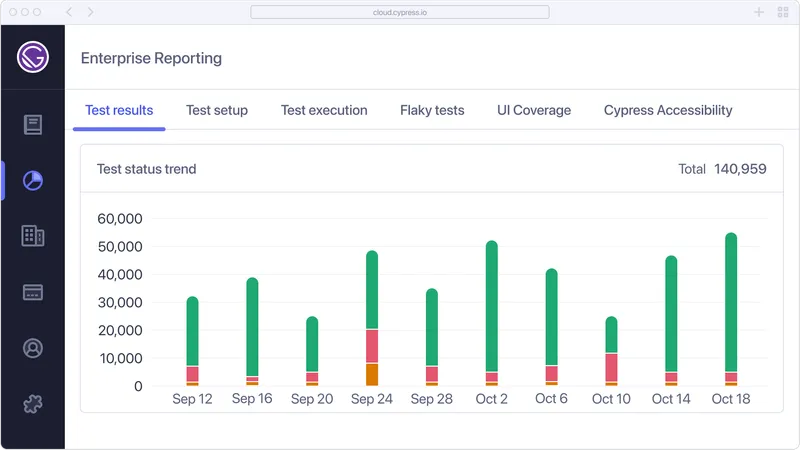
Cypress Cloud is built with enterprise needs in mind, offering tailored solutions for large teams and complex organizations. Advanced reporting and analytics features let teams customize dashboards, filter results, and track trends across multiple projects. Role-based and team-based access controls, SSO, and project-specific permissions make it easy to scale Cypress across your organization. Playwright lacks comparable enterprise-grade features, leaving teams to piece together tools and processes to meet their needs. With Cypress, enterprises get everything they need to manage testing at scale in one unified platform.
Accessibility reporting
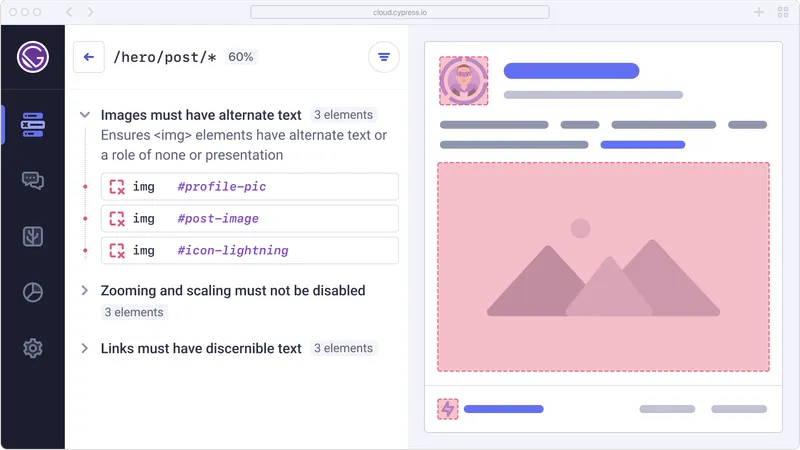
If you own accessibility compliance, the hard question is rarely whether to test for accessibility. It is how to keep up with the volume, the pace of releases, and the gap between what your specialists can review manually and what your application actually ships. Cypress Accessibility helps teams accelerate their processes around compliance, with no setup or configuration. Test results provide per-page insights, highlighting violations and offering actionable recommendations. Playwright does not include native accessibility reporting, leaving teams to implement a separate audit. Cypress simplifies the process, enabling teams to ship inclusive, accessible applications faster and with greater confidence.
UI Coverage visualization
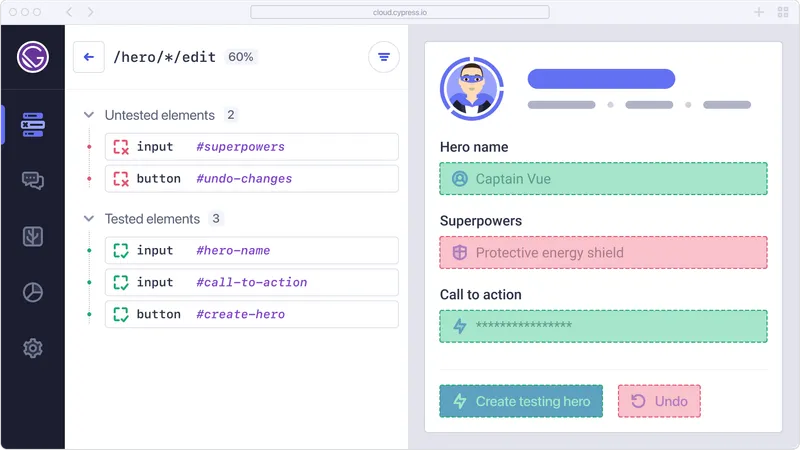
You cannot protect what you cannot see. Cypress Cloud delivers UI Coverage visualization, giving teams a clear view of which parts of an application are being tested and which are not, so teams can prioritize and close gaps before they become production risk. Playwright offers no equivalent insight. With Cypress, your testing strategy has a clear view of what matters most.
Premium support and guidance
While Playwright lacks paid support, it boasts a large online community. Similarly, if you encounter any challenges, our Discord community, with over 13,000 testing peers and experts, is ready to provide assistance. Cypress also offers hands-on support and strategic guidance through Cypress Cloud. Choose Cypress for comprehensive support tailored to your needs.

Feature Comparison
Why choose Cypress over Playwright?
| Feature | Cypress | Playwright |
|---|---|---|
| Test Retries | Supported | Supported |
| Component Testing | Supported | Not supported |
| Branch Review | Supported | Not supported |
| Project Analytics | Supported | Not supported |
| Run groups, filtering, and tagging | Supported | Not supported |
| Org and project management | Supported | Not supported |
| Enterprise Reporting | Supported | Not supported |
| UI Coverage reports | Supported | Not supported |
| Accessibility reports | Supported | Not supported |
| PR Comments | Supported | Not supported |
| Status Checks | Supported | Not supported |
| Team Notifications | Supported | Not supported |
Frequently asked questions
Is Cypress free?
Cypress is a free, downloadable and open source (MIT license) application. This is always free to use.
Cypress Cloud is a web application which records your test runs in CI to help you scale every facet of testing. We offer a variety of billing plans (including a free plan for non-commercial open-source, public projects). Please see our Pricing Page for more details.
What is Cypress Cloud? How does it extend the value of Cypress App?
On most teams, merging your code up beyond your local environment means executing automated tests in a CI pipeline.
Cypress Cloud is a service that unlocks the full potential of Cypress test automation tools in your CI pipeline. Cloud takes the rich result data coming from tests run in the Cypress App and provides developers with a variety of tools for scaling every facet of Cypress testing:
- Smart Orchestration tools to increase speed and conserve resources in your CI runs
- Integrations with popular version control tools like GitHub, GitLab, and Bitbucket
- Increased visibility into test flake and failure
- Analytics for measuring and optimizing your entire test suite
- Specialized products like Cypress Accessibility and UI Coverage, which extend the value of your tests. These help ensure comprehensive coverage of accessibility standards and user interface elements.