 Cypress AI
AI built for every stage of the testing cycle.
With AI writing code faster than your team can review it, testing is now the gatekeeper for quality. Cypress AI keeps the whole loop moving quickly:
- Create self-healing tests in natural language.
- Debug and resolve failures more efficiently.
- Improve quality and coverage on each release.





















Create
Create tests in minutes, not hours.
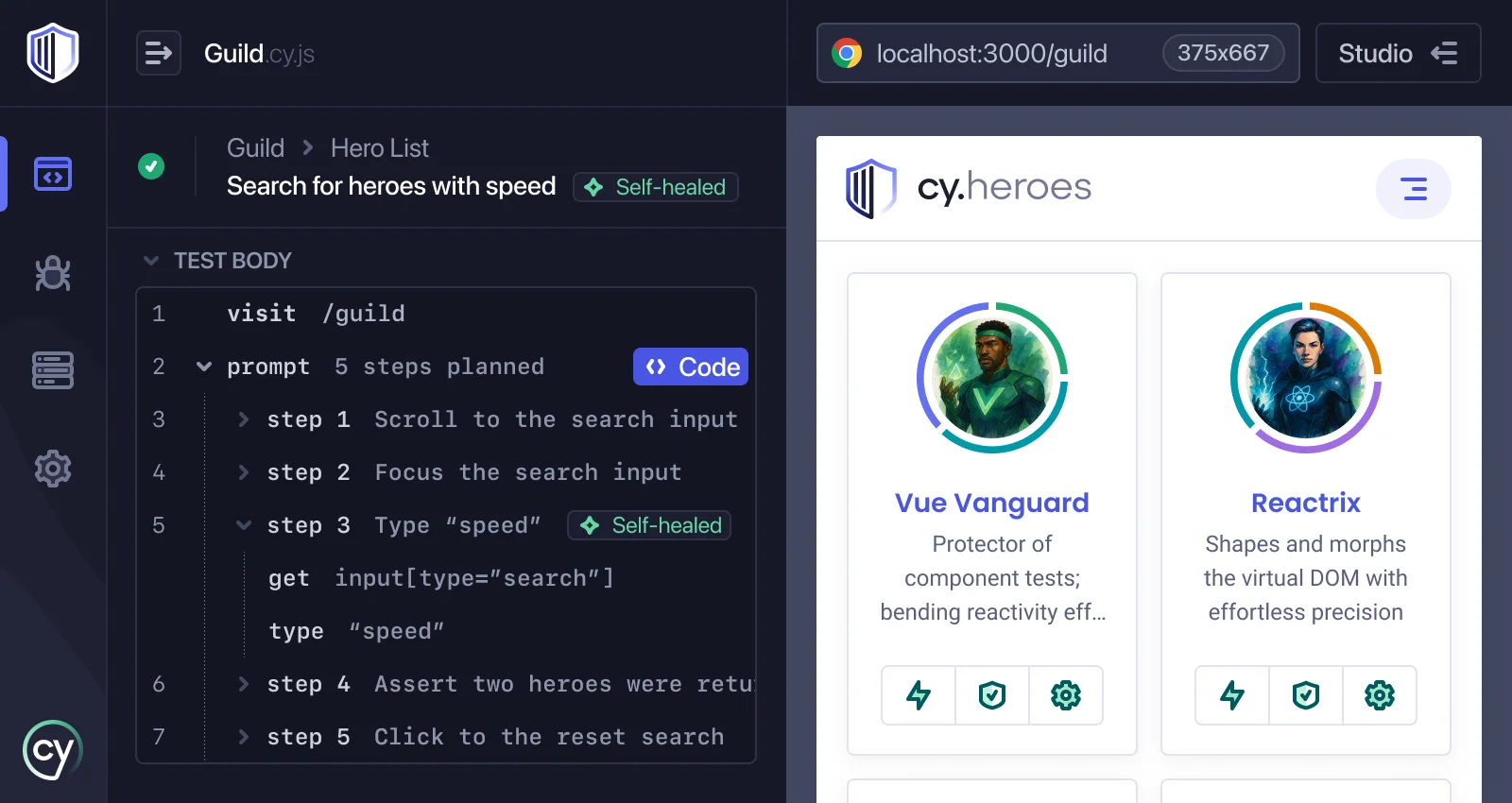
Write self-healing tests in natural language with cy.prompt
Describe what you want in plain English and cy.prompt writes the Cypress commands, evaluating the DOM to build real selectors. Run it once to commit clean code, or leave it running so tests adjust themselves as the UI changes.
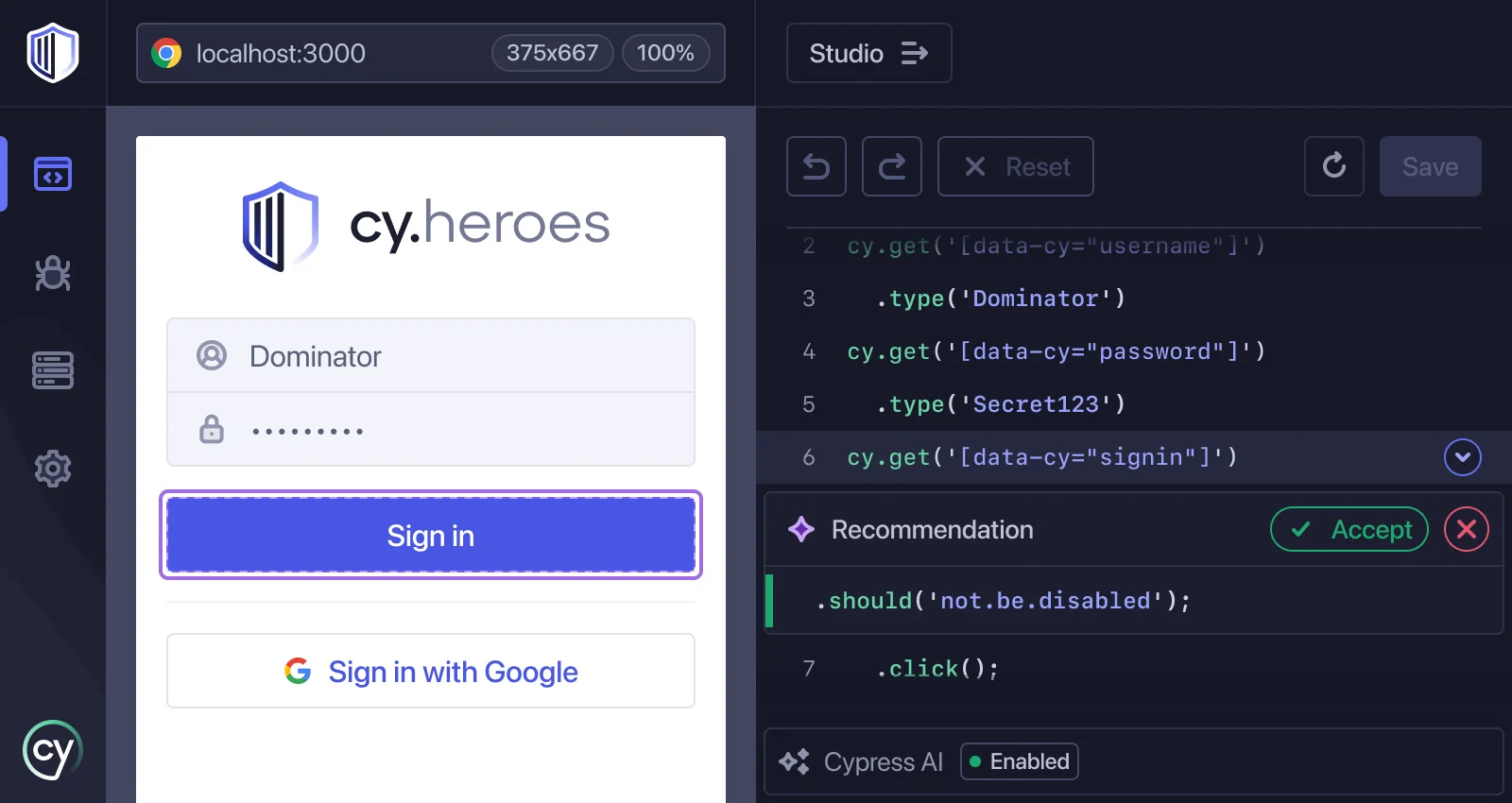
Write tests in seconds with Smart Recommendations in Studio AI
Click through your app and Studio AI watches the DOM for what changed, then suggests assertions for the affected element: visibility, text, form values, URL. Keep the ones that matter and save the test.
Verify new tests on the spotwithcypress tap
Instruct your agent to automatically write a new test and verify it with cypress tap before you commit: the agent runs the spec, reads the failure exactly as the Cypress app shows it, and inspects the DOM at the moment a command ran, then fixes its own work and re-runs to confirm. Or skip the agent and script it into a workflow of your own — it's a CLI command like any other.
I’ll add a new test to the signup.cy.tsspec, then verify it with cypress tap to make sure everything works.
The submit button stays disabled until the email validates — I updated the assertion to wait for the button to enable, and all four tests pass.
Debug
Diagnose, triage, and resolve failures before you even open Test Replay.
Resolve failures automatically with Cloud MCP and Cloud CLI
Instruct your agent to automatically diagnose and resolve a failure without anyone needing to open Cloud: it gets the error, the flake history, the console and network activity, and the DOM exactly as it was when the command ran — everything Test Replay recorded. Add the branch's diff and it can tell whether the test is wrong or the code regressed, fix whichever actually broke, and re-run the spec with cypress tap to confirm the fix holds.
A test failed in CI on checkout-ui — asking Cypress Cloud what happened.
The pay button never enables — the payment intent resolves after the click. Fixing the test and verifying locally.
Fix verified — committing.
Diagnose flake automatically with Cloud MCP and Cloud CLI
Instruct your agent to figure out why a test is flaky, not just that it retried: Cloud MCP tells it whether the failure is a regression or a known flake, then it pulls the failing and passing attempts of the same test with cy-cloud replay timeline and compares them (commands, network, console) to find the exact point where they diverged, then fixes the actual cause instead of retrying again.
The orders.cy.ts spec had 1 flaky test, and the Cypress Cloud MCP confirmed that it’s a known flake, not a regression in this branch. I’ll compare the attempts to find the root cause.
Attempt 1 asserts before the orders response lands — the retry only passed because the network won the race. Waiting on the request instead.
Understand failures at a glance with AI summaries
Open a failed run and know where to look first: every test states what it verifies, and every failure gets a plain-language explanation of what happened and why, right beside the stack trace. Test Intent Summaries cover the what; Error Summaries cover the why. No command logs, no digging.
Improve
Close coverage gaps and resolve violations before they ship.
Close test coverage gaps with Cloud MCP
Point your coding agent at Cloud MCP and it checks UI Coverage for gaps on every pull request, not only when someone remembers to look. When a new gap appears, the agent writes the missing test as part of that PR.
This branch adds elements UI Coverage hasn’t seen tested — pulling the gaps on /checkout from Cypress Cloud.
Writing and running a spec for each untested flow.
Scaffold tests for untested flows with Test Generation
Turn coverage gaps into tests before they ship: when UI Coverage flags an untested flow, generate a targeted Cypress test scaffold directly from the report — no writing from scratch.
Resolve accessibility violations with Cloud MCP
Ship accessibility fixes as diffs you review, not tickets someone picks up later: Cloud MCP hands your coding agent every violation Cypress Accessibility reports — the rule that failed, the elements that triggered it, and the component source.
The redesign introduced 2 accessibility violations on /dashboard — pulling the report from Cypress Cloud.
Adding an aria-label and moving the stat label to a passing gray. Verifying.
AI Skills
Make your AI tools fluent in Cypress
Three open source skills that teach your coding agent Cypress best practices — in Cursor, Claude Code, Copilot, or any tool that supports skills. Install once and every tool picks them up.
cypress-author
Write, update, and fix tests that follow Cypress best practices — stable selectors, retry-friendly assertions, and your project's own commands and fixtures.
cypress-explain
Review and explain existing tests in plain language — intent, structure, and mechanics, with brittle selectors and flaky patterns called out.
cypress-docs
Answer Cypress questions from the official docs, scoped to your version — commands, configuration, and errors, without invented APIs.
Frequently asked questions
What is Cypress AI?
Cypress AI is the set of AI capabilities built into the tools you already use (the Cypress App and Cypress Cloud), rather than a separate product to adopt. In the Cypress App, cy.prompt turns a plain-language description into real Cypress commands, and Studio AI suggests selectors and assertions while you record. In Cypress Cloud, Error Summaries and Test Intent Summaries explain what a test verifies and why it failed, and Cloud MCP hands that same run context to your own coding agent. Each one covers a different stage of the loop: creating tests, debugging failures, and improving coverage on every release.
Which plans include Cypress AI features?
Every plan, including Starter. Cloud MCP is available on all plans, and Smart Recommendations in Studio AI is free during beta. cy.prompt is metered by prompt execution with an organization-wide allotment per plan. Seepricing for the current allotments and the usage limits documentation for how executions are counted.
Does Cypress AI change my tests without me reviewing them?
No. cy.prompt writes standard Cypress commands you read and commit like any other code, and you decide whether to keep it running so tests adjust as the UI changes or to run it once and freeze the output. Studio AI proposes assertions and you choose which ones to save. When a coding agent uses Cloud MCP to fix a failure or add a missing test, the result arrives as a diff on a pull request and goes through your normal review. Cypress AI gives you the context and a starting point; the decision to merge stays yours.
What does Cloud MCP give my coding agent access to?
The same run data Cypress Cloud already records for every test: command history, console logs, network requests, and the Test Replay recording of the run. Your agent reads that context directly instead of you opening Cypress Cloud and stepping through a failure by hand. Combined with your codebase and the branch diff, it has enough to tell whether the test is wrong or the application regressed.
What is AI self-healing?
cy.prompt self-heals a step when the element it needs has changed since the step last ran, so the test keeps passing as the UI evolves. When possible, it heals from a cache of previously successful selectors; if none fit,cy.prompt uses AI to locate the new element. See the self-healing FAQ for how it decides when to heal.
How does Cypress AI use my data?
It depends on the feature. AI Skills run entirely inside your own coding agent (Cursor, Claude Code, Copilot, or any tool that supports skills), so your code and test data never leave your machine. cy.prompt, Studio AI, and Cloud MCP use the run data already stored in the Cypress App and Cypress Cloud — command history, console logs, network requests, and Test Replay recordings — to power that specific feature. See Cypress AI security for the full data-handling policy across every Cypress AI feature.